
Files Stored on Individual Computers
Many offices keep important files on one staff computer. If that computer fails, other users lose access. A file server gives teams a central location with planned permissions and backup.
Server setup and configuration in Bhubaneswar
Practical Windows Server and Linux Server setup for file sharing, users, Active Directory, DHCP, DNS, virtualization, RAID, backup, security and office workloads.
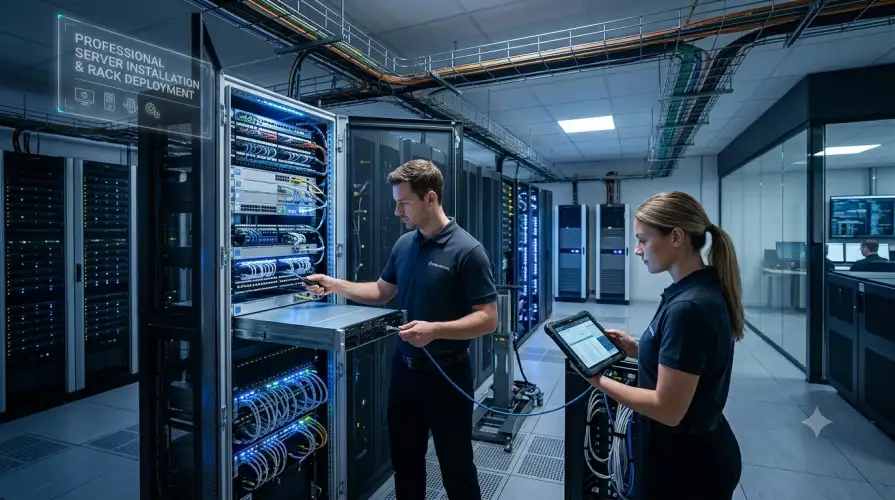
A business server is useful when multiple users need shared files, controlled access, local applications, central storage, backup coordination or directory-based user management. A server should not be treated like a regular desktop computer. It needs planning for hardware, operating system, users, storage, network settings, backup, power protection, security and future maintenance.
The Best Freelancer provides server installation in Bhubaneswar for schools, hospitals, hotels, retail shops, corporate offices, startups, small businesses and selected home office requirements. We configure Windows Server, Linux Server, file servers, basic Active Directory, DHCP, DNS, virtualization, RAID guidance, UPS planning, monitoring, security checks and backup routines depending on the customer’s scope.
The objective is to create a server setup that is understandable, documented and maintainable. We focus on practical reliability instead of unnecessary complexity.
Many offices keep important files on one staff computer. If that computer fails, other users lose access. A file server gives teams a central location with planned permissions and backup.
Shared passwords and open folders create risk. Windows Server with Active Directory or a structured Linux user setup can help control who can access specific files and systems.
Offices often grow with routers, printers, NAS devices and computers added without planning. DHCP and DNS configuration helps organise addressing, naming and service access.
A server without backup is a single point of failure. We review backup targets, schedules, storage capacity and restore testing before the setup is considered complete.
Servers need UPS protection, disk health checks and storage planning. RAID can improve availability after some disk failures, but RAID is not a replacement for backup.
Schools may need servers for labs, shared documents, staff records and controlled access. Hospitals and clinics may need local file storage, billing application support, secure access and backup planning. Hotels may need servers for office files, local applications, reception systems and operational records.
Retail shops and small businesses may use a server for billing data, inventory files, reports and shared access. Corporate offices often need Active Directory, file sharing, user permissions, backup and network services. Startups may need Linux servers, development environments, virtualization and internal tools. Home users may need a compact file server or lab server for learning, backup or personal projects.
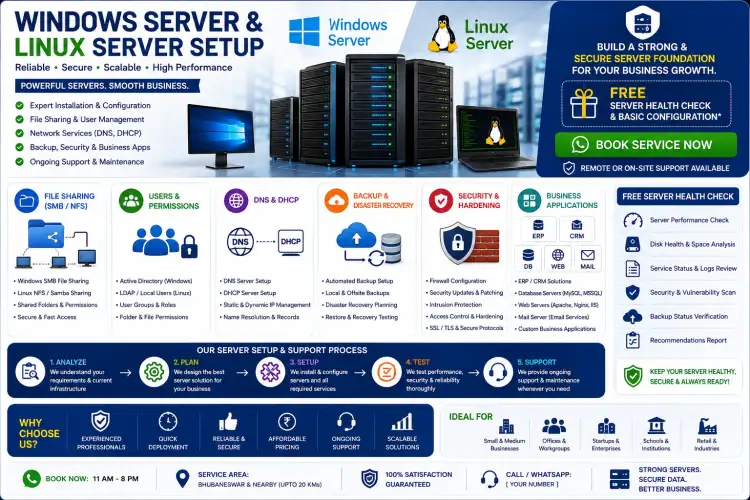
Visiting charges may apply for server assessment, office visits, installation, troubleshooting or training within supported Bhubaneswar areas. Service charges for basic server installation and configuration start from Rs. 2,499 when compatible hardware, operating system media, licences and access details are available.
Final quotation depends on project complexity, server type, operating system, user count, storage size, RAID requirement, Active Directory scope, virtualization requirement, backup planning, network readiness, application dependency, security expectations and support needs. Hardware, licences, replacement parts, cloud subscriptions and third-party software costs are billed separately.
Yes. We provide Windows Server, Linux Server, file server, basic Active Directory, backup and network service setup for homes, offices and institutions in Bhubaneswar.
Windows Server is often suitable for Active Directory, Windows users and Microsoft-based environments. Linux Server is strong for web, development, automation, file services and cost-sensitive workloads.
Active Directory is useful when user accounts, permissions, shared computers and access control need central management. Very small teams may not need it immediately.
No. RAID can protect against some disk failures, but it does not protect against deletion, ransomware, theft, corruption or major hardware failure. Backup is still required.
Yes. We configure DHCP and DNS where the office network requires organised addressing, local name resolution or server-managed network services.
Yes, virtualization can separate workloads where hardware resources and licences allow it. The design should be planned carefully before deployment.
Yes. A UPS is strongly recommended for servers, NAS devices, routers and switches so systems can shut down safely or continue through short power interruptions.
Yes. Ongoing server checks, backup review, updates and troubleshooting can be handled through a support plan or Office AMC.
Share your location, user count, current systems, server requirement, operating system preference and backup needs. We will review the scope and suggest whether a site visit, remote discussion or detailed quotation is required.